AI Explode Effect: Make Anything Burst into Confetti

Upload a photo of an object and watch it burst into colorful confetti. A 5-second AI explode effect video for parties and reveals.

  1. Upload one photo
  2. Keep or tweak the ready-made prompt
  3. Get a 5-second 720p video for 10 credits
Use this template

New accounts get 20 free credits. Failed or blocked videos refund their credits automatically.

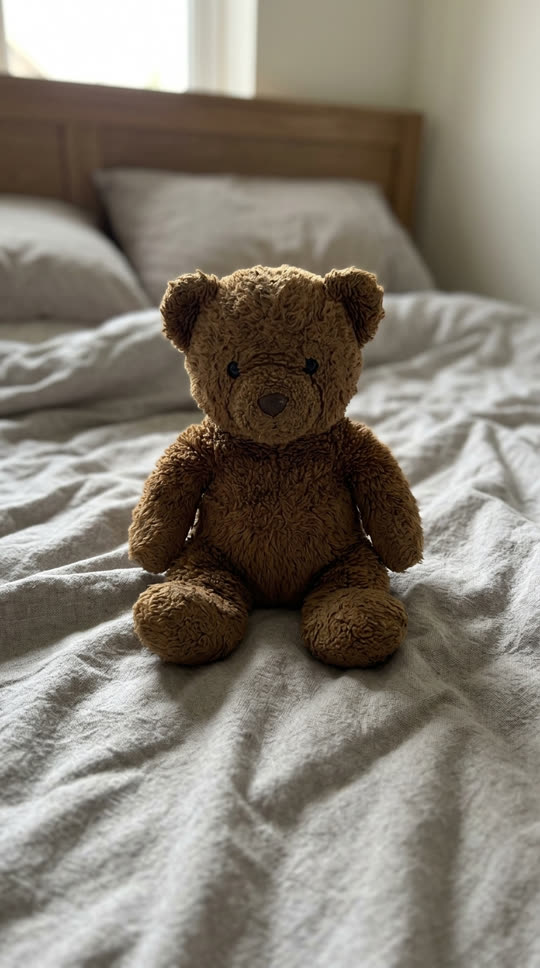

Example photo: a brown teddy bear sitting on a bedExample photo
The teddy bear bursts into colorful confetti that rains onto the bed
Result, made on VidStride
Made on VidStride from the example photo with this prompt: “The teddy bear suddenly explodes into a big burst of colorful confetti and paper streamers; the bear disappears completely and the confetti rains down slowly onto the empty bed. Slow motion, static camera.”

Use the Explode effect template

Use a photo of one object with space around it, such as a toy, gift box, cake or ornament. The prompt below is already filled in; edit it if you want a different look.

Works with pets, products, objects, places and artwork. Photos of real people are not supported by templates.

Underlying model: bytedance/v1-pro-image-to-video. Outputs are AI-generated. Review accuracy and usage rights before use.

Choose a JPG, PNG or WebP (up to 3 MiB)

10 credits per generation

Your recent results

Your result will appear here. You can leave this page and return later.

What the explode effect does

This template makes the object in your photo pop like a party popper. It bursts into colorful confetti and paper streamers, disappears, and the confetti drifts down in slow motion. It is a playful, family-friendly take on the explode effect: no fire, no debris, just a cheerful burst.

Each run makes one 5-second 720p video with ByteDance Seedance 1.0 Pro image-to-video.

Photos that work best

Pick one clear object with some empty space around it: a plush toy, gift box, balloon, cake, figurine or a product you want to reveal. A plain or tidy background lets the confetti stand out.

Photos of people or pets are not supported by this template, and the effect stays deliberately non-violent.

Ideas to try

Burst a gift box for a birthday or gender-reveal post, pop a product to announce a sale, or explode a graduation cap into school-color confetti. Edit the prompt to change the burst: "bursts into gold glitter", "explodes into rose petals" or "pops into a cloud of pastel smoke".

What to expect

The object usually vanishes in the burst, but sometimes part of it remains under the confetti. Simple objects on clean backgrounds give the most dramatic pop. If a generation fails or is blocked by our content checks, its credits come back automatically.

Related templates

Party-ready alternatives: inflate it like a balloon or make the whole room float.

Launching a product? Start with a clean AI product video from one photo, then pop it in confetti for the reveal.
Questions about the Explode effect template

Is the explode effect violent?

No. This template turns objects into confetti, glitter or petals. It does not create fire, injuries or destruction of people or animals.

Can I choose the confetti colors?

Yes. Name the colors in the prompt, for example "bursts into blue and pink confetti".

How long is the video?

Each run creates one 5-second 720p video that follows your photo's framing.

Is it free to try?

New accounts get 20 free credits, enough for two videos. Each video costs 10 credits, and failed or blocked videos are refunded.

See all templates