AI Melt Effect: Make Anything in Your Photo Melt

Upload a photo of an object and watch it slowly melt into a glossy puddle. A 5-second AI melt effect video made from one photo.

  1. Upload one photo
  2. Keep or tweak the ready-made prompt
  3. Get a 5-second 720p video for 10 credits
Use this template

New accounts get 20 free credits. Failed or blocked videos refund their credits automatically.

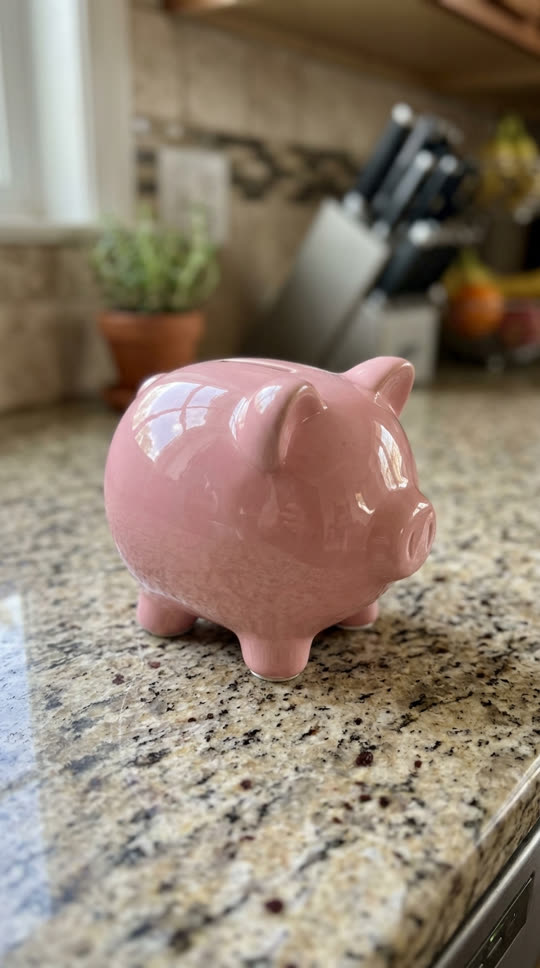

Example photo: a pink ceramic piggy bank on a kitchen counterExample photo
The piggy bank melts like wax into a glossy pink puddle
Result, made on VidStride
Made on VidStride from the example photo with this prompt: “The pink ceramic piggy bank slowly melts like warm wax, sagging and dripping into a glossy pink puddle on the counter, smooth realistic melting, static camera.”

Use the Melt effect template

Use a clear photo of one solid object on a flat surface, with the whole object in the frame. The prompt below is already filled in; edit it if you want a different look.

Works with pets, products, objects, places and artwork. Photos of real people are not supported by templates.

Underlying model: bytedance/v1-pro-image-to-video. Outputs are AI-generated. Review accuracy and usage rights before use.

Choose a JPG, PNG or WebP (up to 3 MiB)

10 credits per generation

Your recent results

Your result will appear here. You can leave this page and return later.

What the melt effect does

The melt template makes a solid object behave like warm wax: it softens, sags, drips and spreads into a puddle that keeps the object's color. Static camera, realistic lighting, five seconds from solid to liquid. It is the kind of satisfying clip people loop and share.

Each run makes one 5-second 720p video with ByteDance Seedance 1.0 Pro image-to-video, starting from your photo.

Objects that melt best

Solid, single-color or glossy objects melt most convincingly: figurines, mugs, toys, candles, chocolate, ornaments, sneakers or a phone case. Put the object on a flat surface such as a table or counter so there is somewhere for the puddle to spread.

Keep the whole object in the frame with a little space around it. Photos of people or pets are not supported by this template.

Ideas to try

Melt a product to tease a summer sale, melt a trophy for a sports joke, or melt a candle shaped like a holiday character. Change the prompt for a different feel: "melts into chocolate", "melts slowly in the sun" or "drips off the edge of the table".

What to expect

Busy scenes with many objects can make the model melt the wrong thing, so one clear subject works best. Text and logos on the object will distort as it melts. If a generation fails or is blocked by our content checks, its credits come back automatically.

Related templates

Other satisfying object effects: crush it with a hydraulic press or squash it like dough.

Selling the object instead? Turn the same photo into a 360° product spin video.

Questions about the Melt effect template

Can I melt a person or a pet?

No. The melt template is for objects. Photos of people are not supported, and we do not offer effects that distort real people.

How long does the melt video take?

Most videos are ready in a few minutes. The 5-second clip appears in your library when it is done, and you can leave the page while it renders.

Can I change what it melts into?

Yes. Edit the prompt before you generate, for example "melts into melted chocolate" or "melts into a rainbow puddle".

Is the melt effect free?

New accounts get 20 free credits, enough for two videos. After that a video costs 10 credits, and failed or blocked ones are refunded.

See all templates